Introducing the Mixlayer CLI
A lot of you spend your day in a terminal, and more and more of you have a coding agent working in there too. We want Mixlayer to be the easiest tool either of you can reach for, so we built a CLI and made it as agent-friendly as we could.
The Mixlayer CLI is out today. It's open source under Apache 2.0 and written in Rust. It ships as two binaries, mxl and mxl-mcp, with builds for macOS, Linux and Windows.
Grab an API key from the console, then on macOS or Linux:
curl -fsSL https://github.com/mixlayer/cli/releases/latest/download/install.sh | sh
export MIXLAYER_API_KEY="your-key"
mxl ask "Explain the CAP theorem in two sentences"On Windows, download the build for your machine from the releases page. If something doesn't work, mxl doctor tells you whether the key is set and the API is reachable, and it never prints the key.
From there it works like any other model CLI.
Compare models before you pick one
Our catalog changes often, and the best way to choose a model is to run your own prompt through a few of them. ladder runs one prompt across several models and shows each answer with its latency, token count and cost.
mxl ladder "TCP vs UDP in under ten words." \
  --rungs qwen/qwen3.5-9b,deepseek/deepseek-v4.1-flash,z-ai/glm-5.3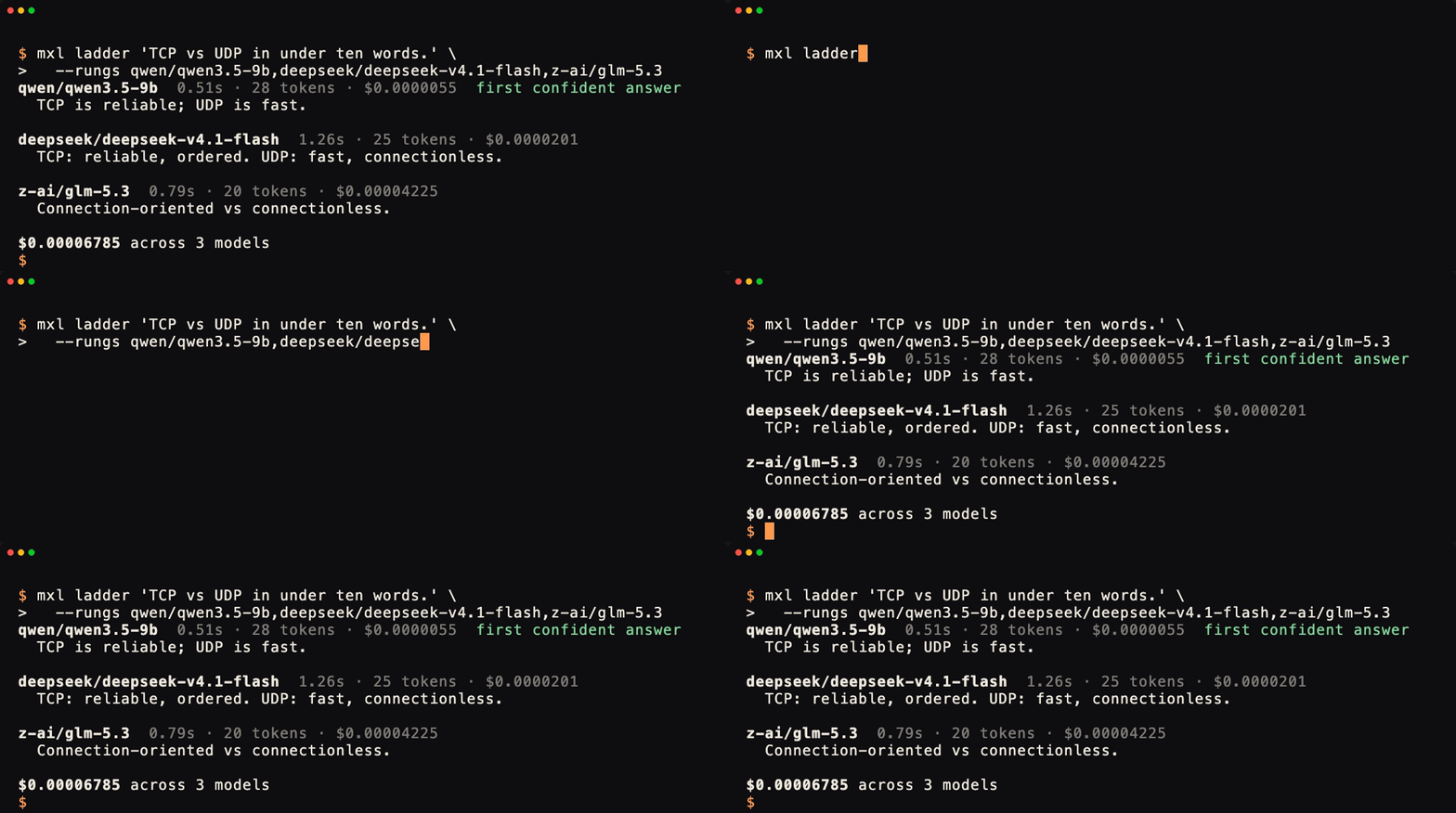
A few more commands build on the same idea:
escalatestarts on the cheapest model and only moves up when the answer looks unsure.councilasks several models and has a judge model reconcile their answers and flag where they disagree.compareruns a cheap model and a frontier model on your prompt and prices the difference.savingstotals your real usage against what the same tokens would have cost at frontier prices. It's a what-if number, useful for comparison rather than a figure from your bill.
Prices come from your organization's live catalog. mxl models list --live-prices shows what you can call and what it costs.
Hand it to your coding agent
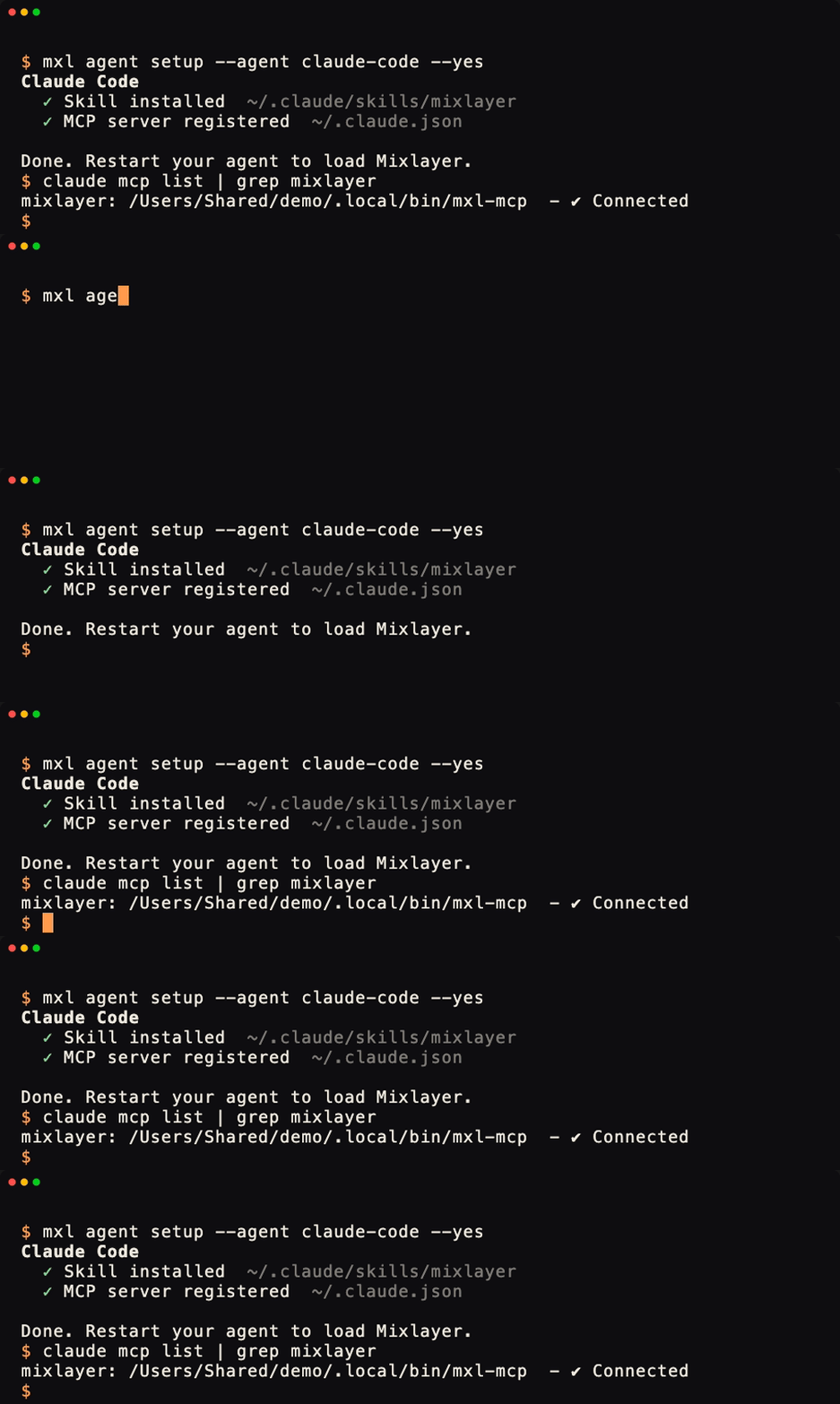
One command installs a Mixlayer skill and MCP server into Claude Code:
mxl agent setup --agent claude-code --yesCodex, Cursor, Hermes and Claude Desktop work the same way, or use --agent all. Without --yes, setup only shows what it would change. It backs up any file it edits and never writes your API key into an agent's config; the agent reads the key from MIXLAYER_API_KEY in its own environment.
The MCP server gives your agent tools for asking models, running a ladder, masking data with shield, and searching or querying past runs. A few things stay out of it on purpose, including key management and the vault that holds your original private values. Agents send what they read to a remote model, so those stay on your machine.
If you do want your agent to manage your account, add --platform. Claude Code, Codex or Cursor then connect to our hosted Platform MCP server and can list and create keys, check usage and spend, manage members and read invoices. What they can do depends on the permissions of the key you give it.
If you script against the CLI yourself, most commands take --agent for JSON on stdout with no prompts, and --dry-run shows a request before it's sent. Errors come back as exit codes a script can branch on. Agent mode also turns on by itself when the CLI detects Claude Code, Codex, Cursor or Gemini CLI. For an agent that's new to it, mxl agent-context lists every command and flag as JSON, and mxl which "compare models" points it at the right command.
Run your agent on our models
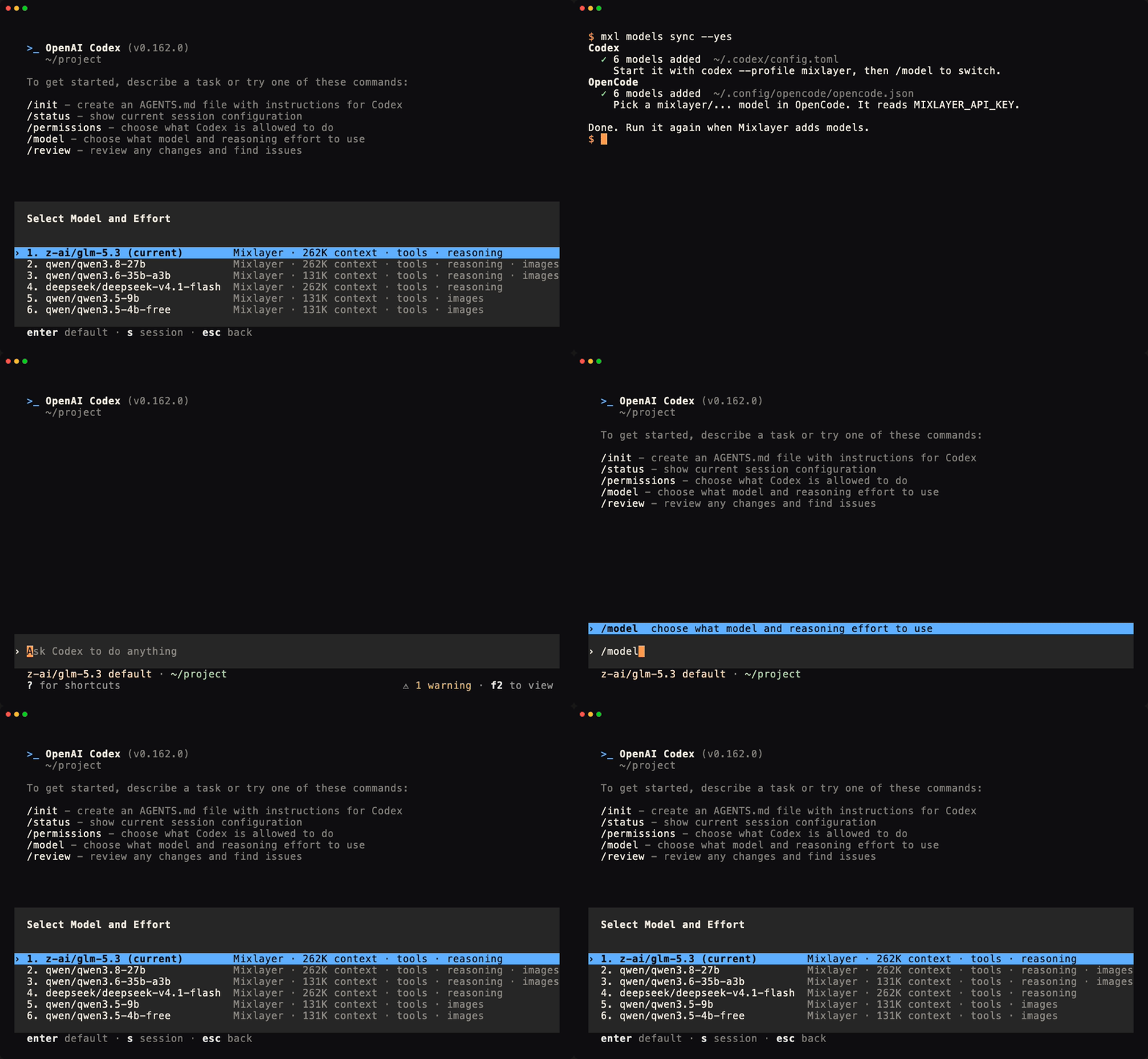
agent setup teaches your agent to call the CLI. mxl models sync goes a step further: it adds our models to Codex, OpenCode and Hermes as a model provider, so the agent itself runs on GLM, DeepSeek or Qwen.
mxl models sync --yesIn Codex, start codex --profile mixlayer and switch models with /model. Each model comes with its real context window, and your normal Codex setup keeps its own models. OpenCode and Hermes read your key from MIXLAYER_API_KEY, and none of them get it written into their config. Run the command again when we add models.
Or have your agent set it up
You can also skip the install and give your agent the skill. The skill includes instructions for installing the CLI and checking the setup, so the agent can do it for you.
- Hermes:
hermes skills install mixlayer/cli/skills/mixlayer - Codex, Cursor and others:
npx skills add mixlayer/cli --skill mixlayer -g -y - OpenClaw: tell it "Install the Mixlayer skill from https://github.com/mixlayer/cli/tree/main/skills/mixlayer"
Then ask it to set up the Mixlayer CLI, compare two models on a question you care about, and show you what each answer cost.
Run your account from the terminal
These commands use the Platform API, so you can manage your account without opening the console.
mxl whoami
mxl keys mint --ttl 30m -- mxl models list
mxl spend --range current --fail-over 5
mxl budget set --monthly-limit 25 --warn-at 20 --yes
mxl audit --since 24h --followwhoami shows what your key can do without printing it. keys mint creates a short-lived key for a single command and deletes it when the command ends. spend --fail-over exits with code 9 when usage passes the amount you set, which lets a script stop itself. budget set caps monthly spend, and audit --follow keeps watching for new account changes.
Keep personal data out of prompts
Mixlayer runs with zero data retention by default. Some of you have told us you'd also like to use frontier models like GPT or Claude without handing them all your data. shield ask sets that up for you.
It masks the names, emails, phone numbers and IDs it finds, sends the masked prompt to the model you pick (on Mixlayer, OpenAI, Anthropic or OpenRouter), and puts the real values back into the answer on your machine. The mapping between placeholders and real values stays in a local vault on your machine.
mxl shield ask "Which customers will churn, and what should we do this week?" \
  --data customers.csv --mask-columns customer,company --show-sent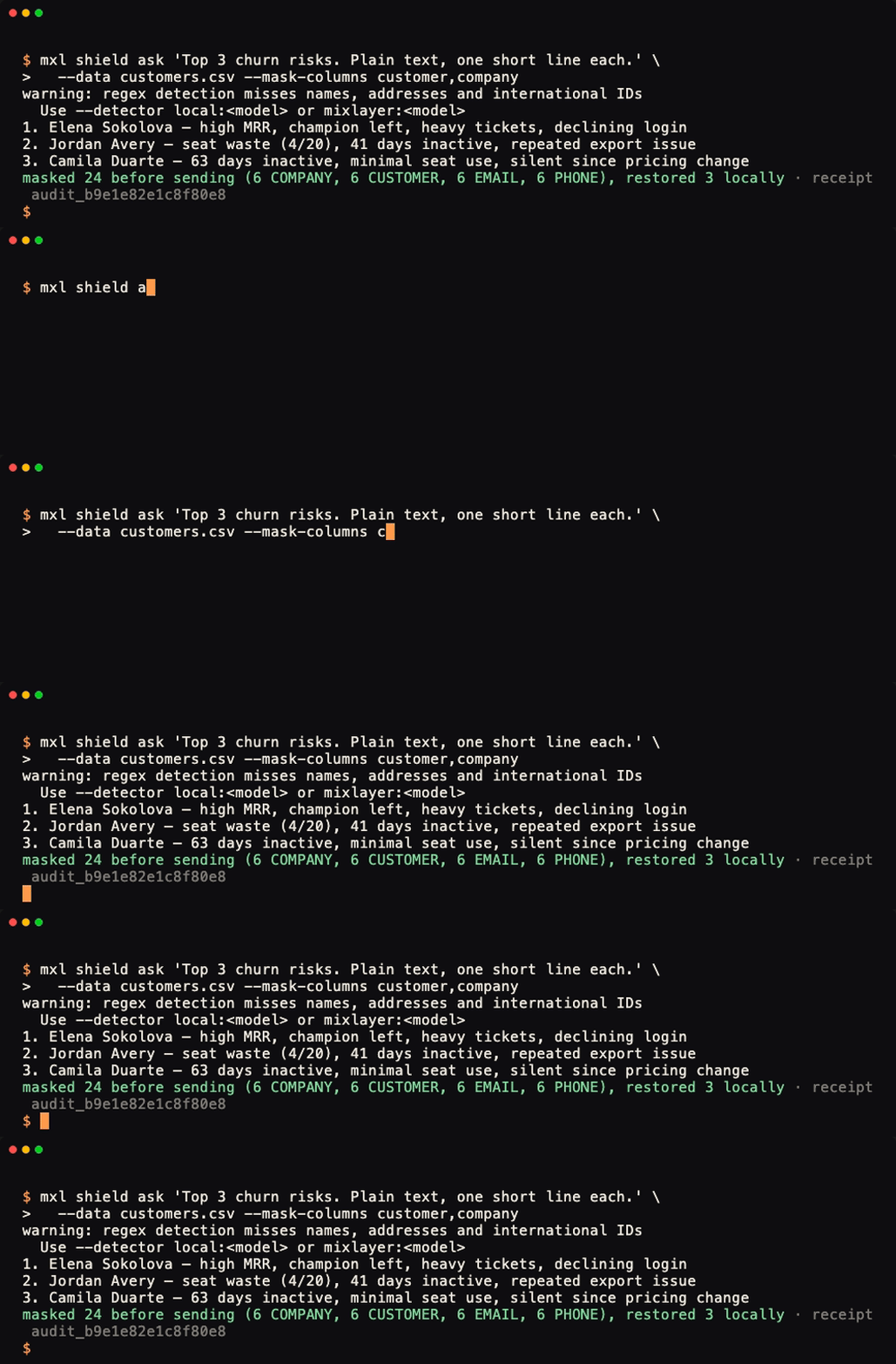
The default detector uses pattern matching, which is good at emails, phone numbers, card numbers and IDs and misses a lot of names. For free text, point --detector at a local model, or use --mask-columns to mask every value in the columns you know are private. Sending to another provider with pattern matching alone requires --accept-regex-only, so you make that choice on purpose. Before every send, shield scans the masked prompt again and stops if anything still looks personal, unless you override it with --force.
Every run is saved locally
Model runs from ask, ladder, escalate, council, compare and shield ask land in a local SQLite ledger with the prompt that was sent, the answer, tokens and cost. For shield runs, that's the masked prompt.
mxl grep "migration" --limit 10
mxl replay <run-id>
mxl sql "select model, count(*), sum(cost_usd) from runs group by model"grep searches old answers, replay re-runs a prompt with the same model and seed so you can check for drift, and sql gives you read-only queries over your own spend.
What's next
The README covers every command and links to the full reference. We'd like to hear what you want the CLI to do next, or what would make it better. Open an issue on GitHub or tell us in Discord.